# Size Limit [![Cult Of Martians][cult-img]][cult]
Size Limit is a performance budget tool for JavaScript. It checks every commit
on CI, calculates the real cost of your JS for end-users and throws an error
if the cost exceeds the limit.
- **ES modules** and **tree-shaking** support.
- Add Size Limit to **Travis CI**, **Circle CI**, **GitHub Actions**
or another CI system to know if a pull request adds a massive dependency.
- **Modular** to fit different use cases: big JS applications
that use their own bundler or small npm libraries with many files.
- Can calculate **the time** it would take a browser
to download and **execute** your JS. Time is a much more accurate
and understandable metric compared to the size in bytes.
- Calculations include **all dependencies and polyfills**
used in your JS.

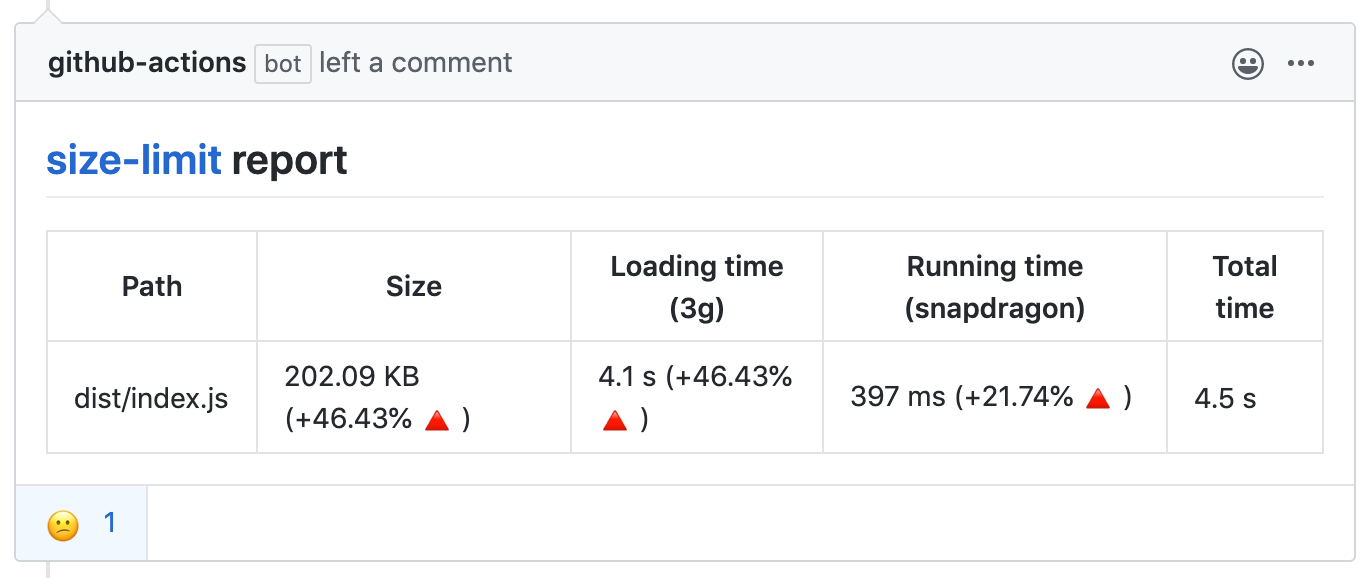
With **[GitHub action]** Size Limit will post bundle size changes as a comment
in pull request discussion.
With `--why`, Size Limit can tell you _why_ your library is of this size
and show the real cost of all your internal dependencies.


[github action]: https://github.com/andresz1/size-limit-action
[cult-img]: http://cultofmartians.com/assets/badges/badge.svg
[cult]: http://cultofmartians.com/tasks/size-limit-config.html
## Who Uses Size Limit
- [MobX](https://github.com/mobxjs/mobx)
- [Material-UI](https://github.com/callemall/material-ui)
- [Autoprefixer](https://github.com/postcss/autoprefixer)
- [PostCSS](https://github.com/postcss/postcss) reduced
[25% of the size](https://github.com/postcss/postcss/commit/150edaa42f6d7ede73d8c72be9909f0a0f87a70f).
- [Browserslist](https://github.com/ai/browserslist) reduced
[25% of the size](https://github.com/ai/browserslist/commit/640b62fa83a20897cae75298a9f2715642531623).
- [EmojiMart](https://github.com/missive/emoji-mart) reduced
[20% of the size](https://github.com/missive/emoji-mart/pull/111)
- [nanoid](https://github.com/ai/nanoid) reduced
[33% of the size](https://github.com/ai/nanoid/commit/036612e7d6cc5760313a8850a2751a5e95184eab).
- [React Focus Lock](https://github.com/theKashey/react-focus-lock) reduced
[32% of the size](https://github.com/theKashey/react-focus-lock/pull/48).
- [Logux](https://github.com/logux) reduced
[90% of the size](https://github.com/logux/logux-client/commit/62b258e20e1818b23ae39b9c4cd49e2495781e91).
## How It Works
1. Size Limit contains a CLI tool, 3 plugins (`file`, `webpack`, `time`)
and 3 plugin presets for popular use cases (`app`, `big-lib`, `small-lib`).
A CLI tool finds plugins in `package.json` and loads the config.
2. If you use the `webpack` plugin, Size Limit will bundle your JS files into
a single file. It is important to track dependencies and webpack polyfills.
It is also useful for small libraries with many small files and without
a bundler.
3. The `webpack` plugin creates an empty webpack project, adds your library
and looks for the bundle size difference.
4. The `time` plugin compares the current machine performance with that of
a low-priced Android devices to calculate the CPU throttling rate.
5. Then the `time` plugin runs headless Chrome (or desktop Chrome if it’s
available) to track the time a browser takes to compile and execute your JS.
Note that these measurements depend on available resources and might
be unstable. [See here](https://github.com/mbalabash/estimo/issues/5)
for more details.
## Usage
### JS Applications
Suitable for applications that have their own bundler and send the JS bundle
directly to a client (without publishing it to npm). Think of a user-facing app
or website, like an email client, a CRM, a landing page or a blog with
interactive elements, using React/Vue/Svelte lib or vanilla JS.
Show instructions
1. Install the preset:
```sh
$ npm install --save-dev size-limit @size-limit/preset-app
```
2. Add the `size-limit` section and the `size` script to your `package.json`:
```diff
+ "size-limit": [
+ {
+ "path": "dist/app-*.js"
+ }
+ ],
"scripts": {
"build": "webpack ./webpack.config.js",
+ "size": "npm run build && size-limit",
"test": "jest && eslint ."
}
```
3. Here’s how you can get the size for your current project:
```sh
$ npm run size
Package size: 30.08 KB with all dependencies, minified and gzipped
Loading time: 602 ms on slow 3G
Running time: 214 ms on Snapdragon 410
Total time: 815 ms
```
4. Now, let’s set the limit. Add 25% to the current total time and use that as
the limit in your `package.json`:
```diff
"size-limit": [
{
+ "limit": "1 s",
"path": "dist/app-*.js"
}
],
```
5. Add the `size` script to your test suite:
```diff
"scripts": {
"build": "webpack ./webpack.config.js",
"size": "npm run build && size-limit",
- "test": "jest && eslint ."
+ "test": "jest && eslint . && npm run size"
}
```
6. If you don’t have a continuous integration service running, don’t forget
to add one — start with [Travis CI].